scgraph
SCGraph



A high-performance, lightweight Python library for shortest path routing on geographic and supply chain networks.
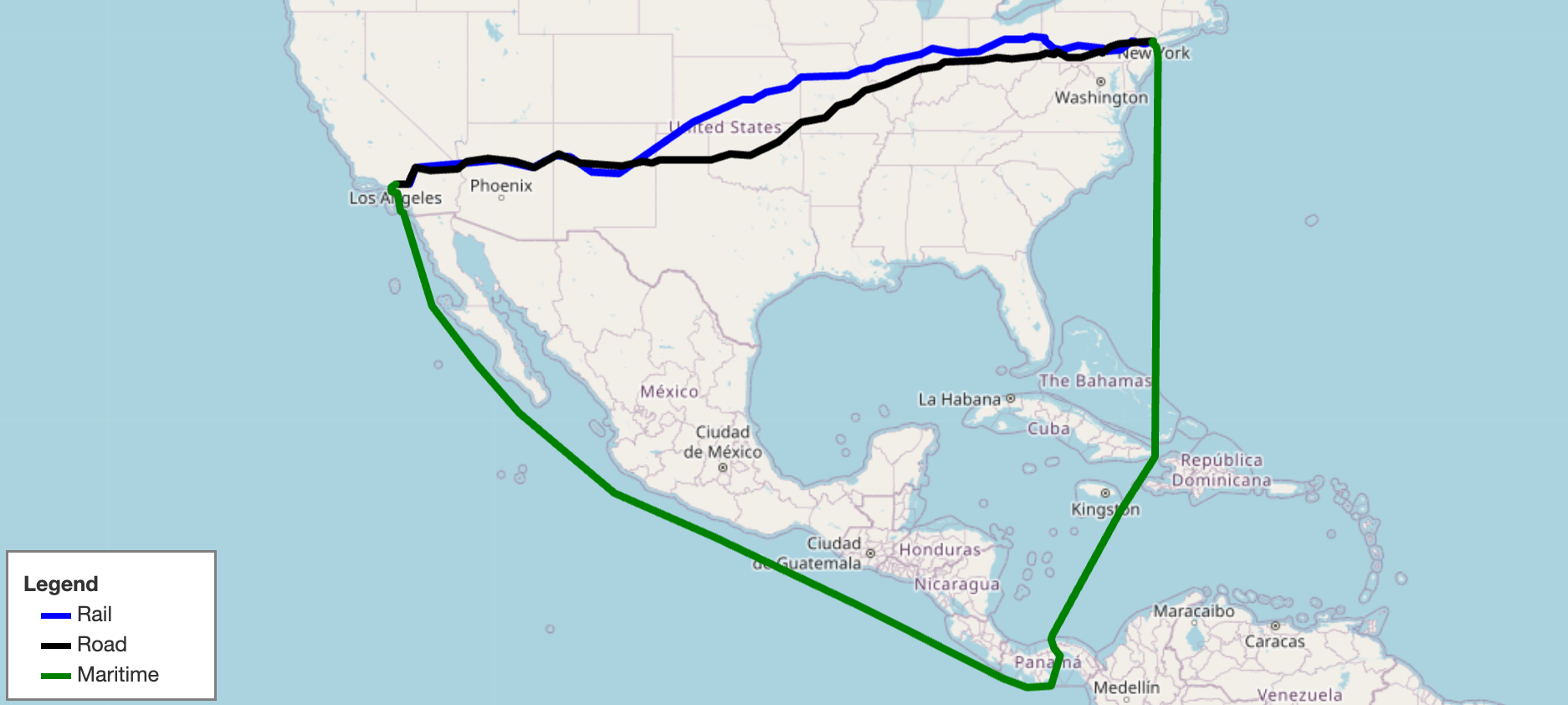
SCGraph provides fast, flexible shortest path routing for road, rail, maritime, and custom networks. It ships with prebuilt geographic networks, supports arbitrary graph construction and OSMNx integration, and scales from simple point-to-point queries to massive distance matrices. It also supports graph reduction, lazy loading, optional C++ acceleration, and Contraction Hierarchy preprocessing for large-scale applications.
- Docs: https://connor-makowski.github.io/scgraph/scgraph.html
- Paper: https://ssrn.com/abstract=5388845
- Award: 2025 MIT Prize for Open Data
Citation
If you use SCGraph in your research, please cite:
Makowski, C., Saragih, A., Guter, W., Russell, T., Heinold, A., & Lekkakos, S. (2025). SCGraph: A Dependency-Free Python Package for Road, Rail, and Maritime Shortest Path Routing Generation and Distance Estimation. MIT Center for Transportation & Logistics Research Paper Series, (2025-028). https://ssrn.com/abstract=5388845
@article{makowski2025scgraph,
  title={SCGraph: A Dependency-Free Python Package for Road, Rail, and Maritime Shortest Path Routing Generation and Distance Estimation},
  author={Makowski, Connor and Saragih, Austin and Guter, Willem and Russell, Tim and Heinold, Arne and Lekkakos, Spyridon},
  journal={MIT Center for Transportation & Logistics Research Paper Series},
  number={2025-028},
  year={2025},
  url={https://ssrn.com/abstract=5388845}
}
Installation
pip install scgraph
Pure Python Installation (Skip Binary Builds)
If you want to install scgraph in pure Python mode without compiling or using binary extensions (or in environments without a C++ compiler):
Linux / macOS / WSL2:
SCGRAPH_NO_BUILD=1 pip install --no-binary scgraph scgraphOr with
uv:SCGRAPH_NO_BUILD=1 uv pip install --no-binary scgraph scgraphWindows (PowerShell):
$env:SCGRAPH_NO_BUILD="1"
pip install --no-binary scgraph scgraph
Windows (CMD):
set SCGRAPH_NO_BUILD=1
pip install --no-binary scgraph scgraph
Automatic Fallback
When building from source, if a C++ compiler is not available or compilation fails, scgraph will automatically fall back to a pure Python implementation.
Quick Start: Using Built-in GeoGraphs
Get the shortest maritime path between Shanghai and Savannah, GA:
from scgraph import GeoGraph

marnet_geograph = GeoGraph.load_geograph("marnet")

output = marnet_geograph.get_shortest_path(
    origin_node={"latitude": 31.23, "longitude": 121.47},
    destination_node={"latitude": 32.08, "longitude": -81.09},
    output_units='km',
)
print(output['length'])  #=> 19596.4653
The output dictionary always contains:
| Key | Description |
|---|---|
length |
Distance along the shortest path in the requested output_units |
coordinate_path |
List of [latitude, longitude] pairs making up the path |
Built-in Geographs
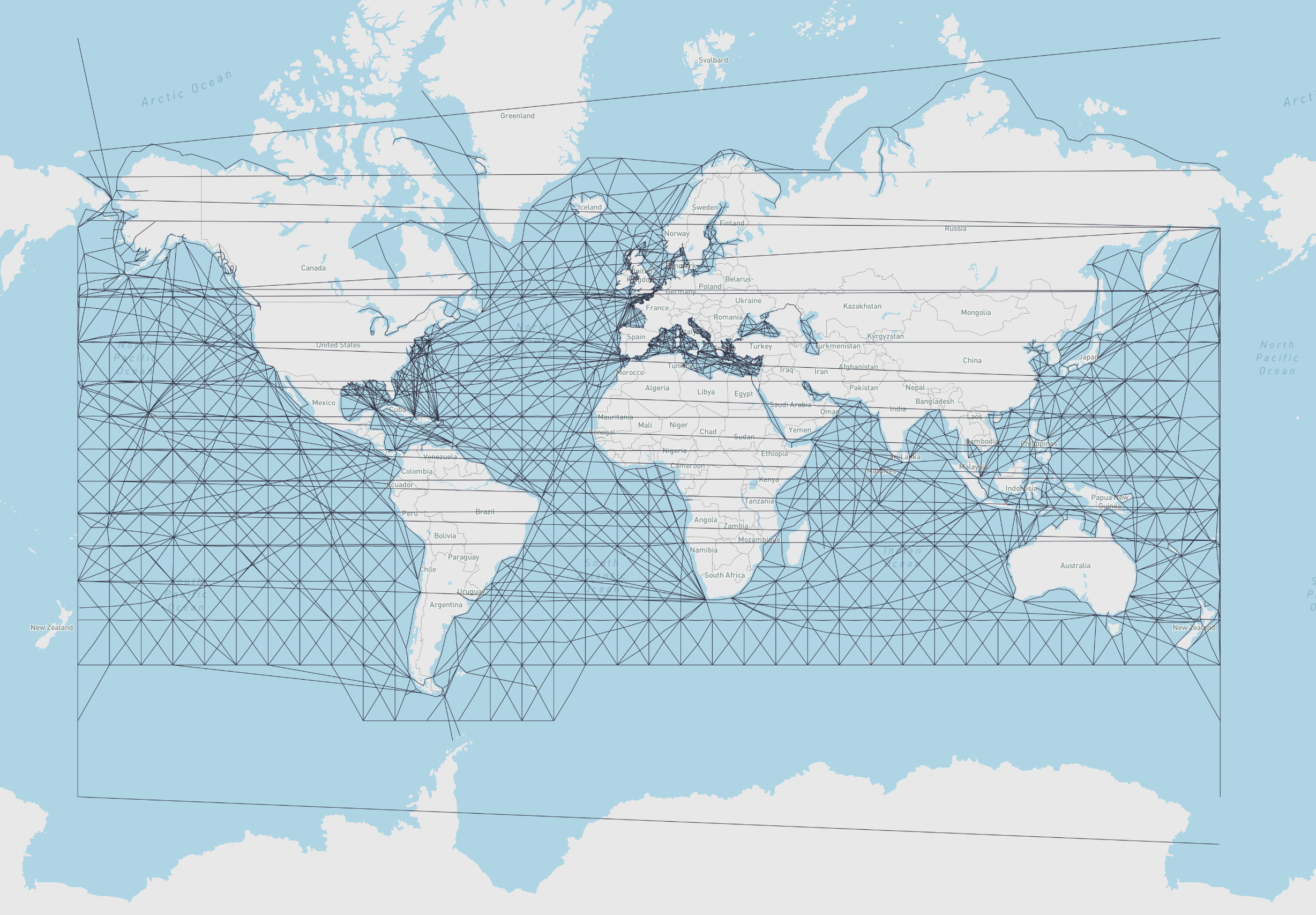
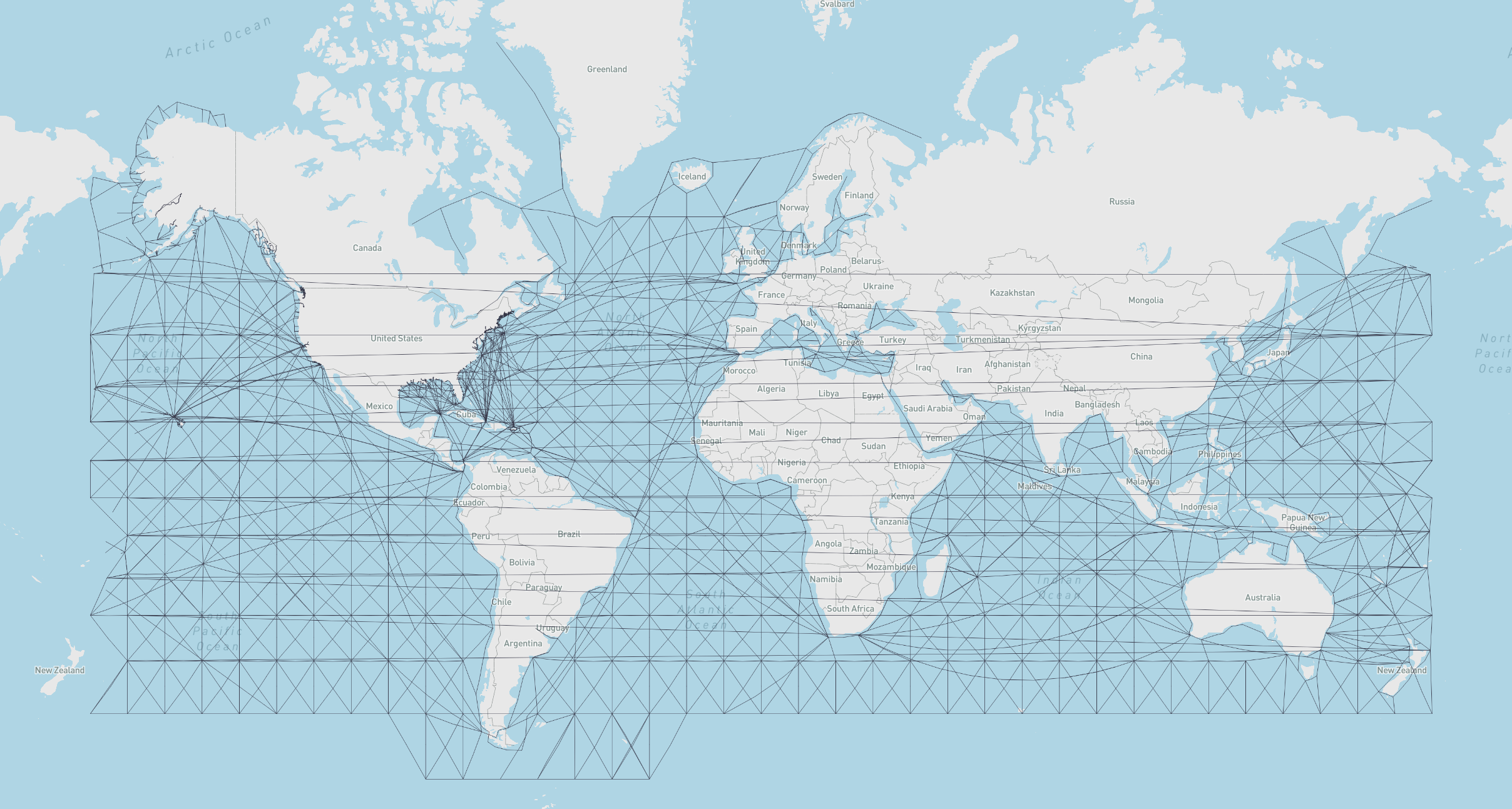
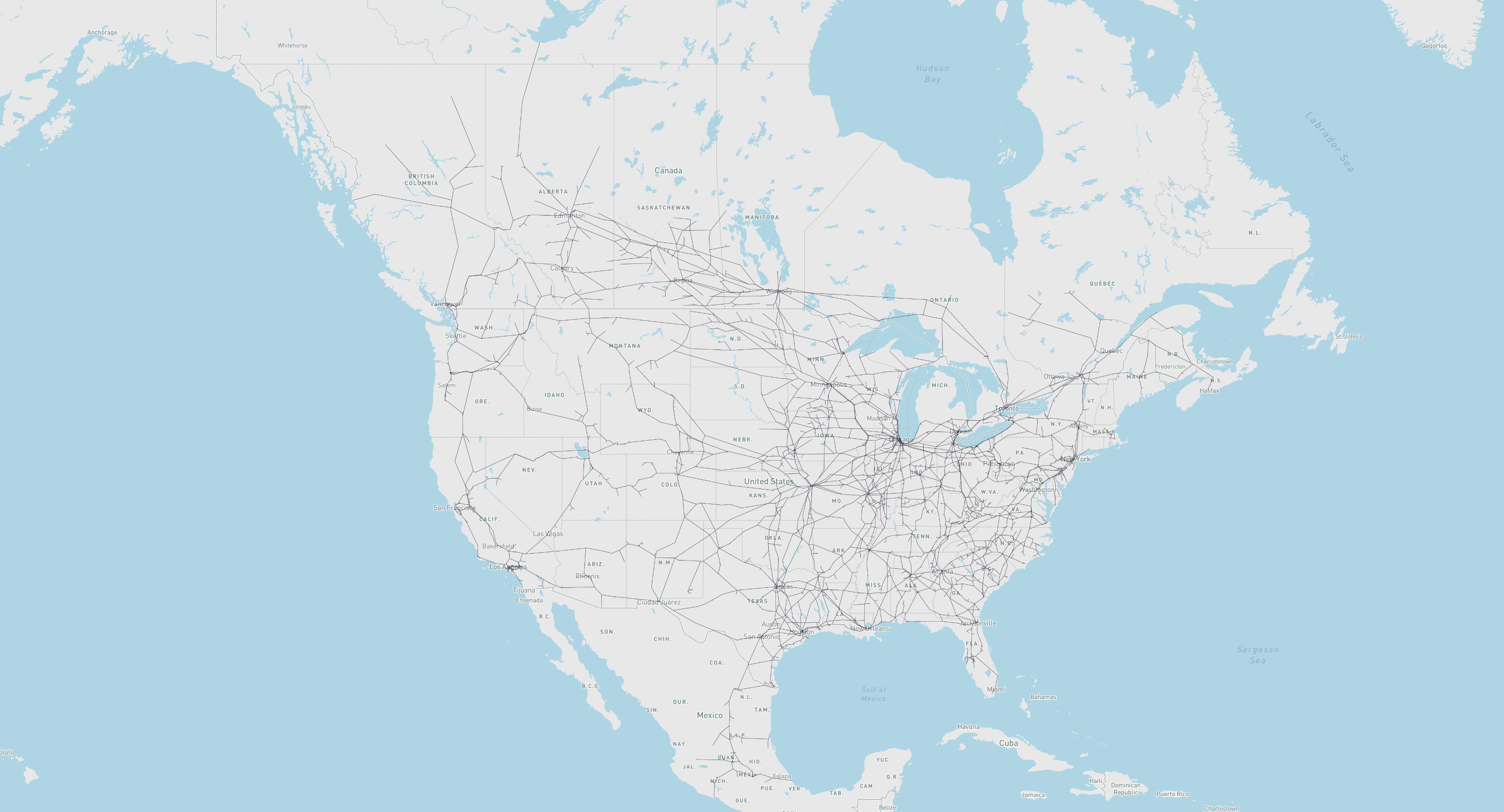
All built-in geographs measure distances in kilometers and are downloaded on first use and cached locally.
| Name | Load Key | Description | Attribution |
|---|---|---|---|
marnet |
GeoGraph.load_geograph("marnet") |
Maritime network | searoute · Map |
oak_ridge_maritime |
GeoGraph.load_geograph("oak_ridge_maritime") |
Maritime network (Oak Ridge National Laboratory) | ORNL / Geocommons · Map |
north_america_rail |
GeoGraph.load_geograph("north_america_rail") |
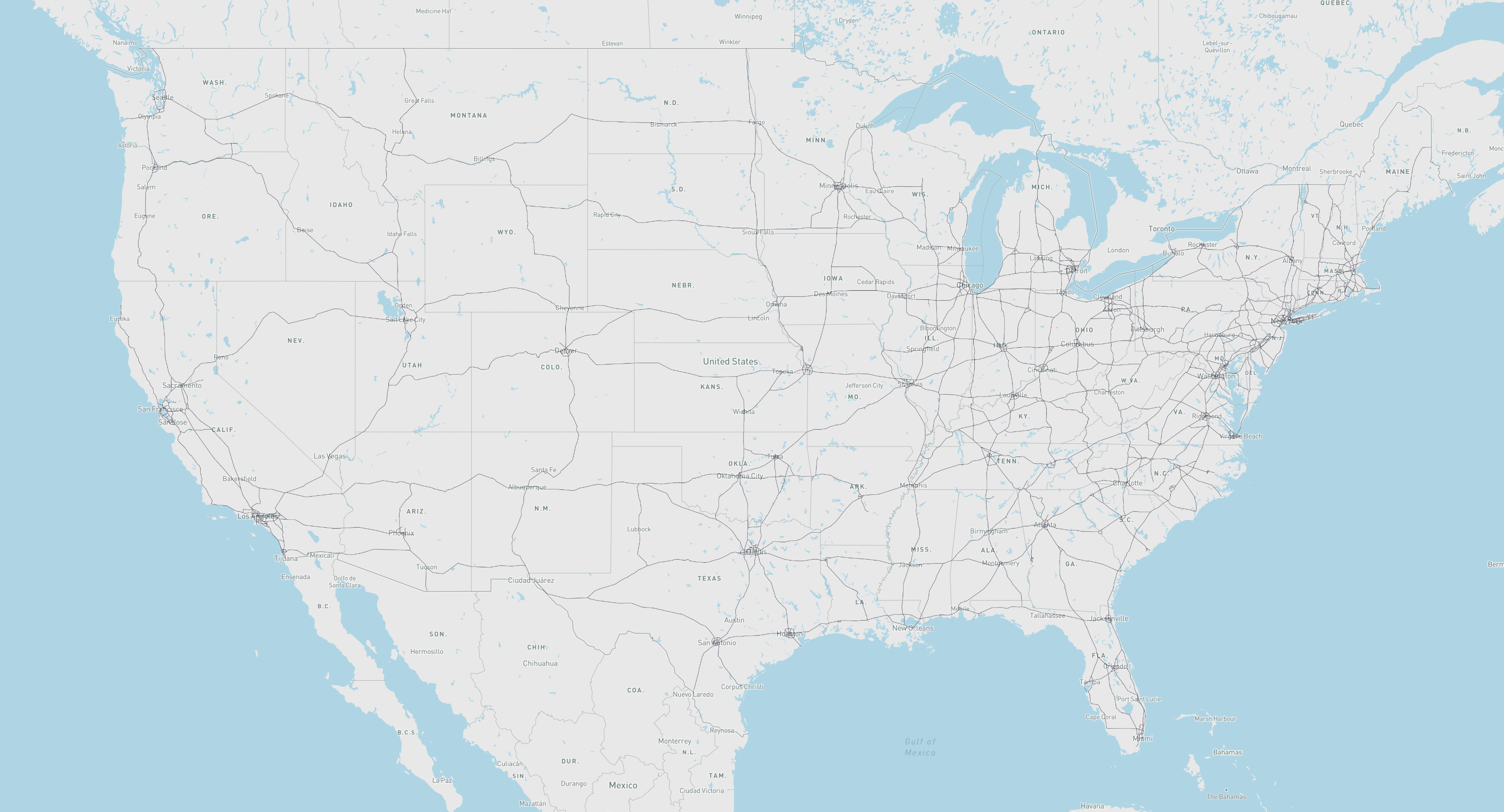
Class 1 rail network for North America | USDOT ArcGIS · Map |
us_freeway |
GeoGraph.load_geograph("us_freeway") |
Freeway network for the United States | USDOT ArcGIS · Map |
world_highways_and_marnet |
GeoGraph.load_geograph("world_highways_and_marnet") |
World highway network merged with the maritime network | OpenStreetMap / searoute |
world_highways |
GeoGraph.load_geograph("world_highways") |
World highway network | OpenStreetMap |
world_railways |
GeoGraph.load_geograph("world_railways") |
World railway network | OpenStreetMap |
Quick Start: OSMNx Integration
Route on any OpenStreetMap network (including bike, drive, and walk) using OSMNx. This example finds the fastest and shortest bike paths between two points in Somerville and Cambridge, MA, then cross-evaluates each path's time and distance:
import osmnx as ox
from scgraph import GeoGraph

# Download the bike network for Somerville and Cambridge, MA
G = ox.graph_from_place(
    ['Somerville, Massachusetts, USA', 'Cambridge, Massachusetts, USA'],
    network_type='bike'
)
G = ox.add_edge_speeds(G)
G = ox.add_edge_travel_times(G)

# Build a time-based and a distance-based GeoGraph from the same OSMNx graph
geograph_time     = GeoGraph.load_from_osmnx_graph(G, weight_key='travel_time')
geograph_distance = GeoGraph.load_from_osmnx_graph(G, weight_key='length')

origin      = {'latitude': 42.3601, 'longitude': -71.0942}  # MIT campus
destination = {'latitude': 42.3876, 'longitude': -71.0995}  # Somerville City Hall

time_result     = geograph_time.get_shortest_path(origin_node=origin, destination_node=destination, output_path=True)
distance_result = geograph_distance.get_shortest_path(origin_node=origin, destination_node=destination, output_path=True)

# Cross-evaluate: get the distance of the time-optimal path, and vice versa
time_path_distance_km = geograph_distance.get_path_weight(time_result)
distance_path_time_s  = geograph_time.get_path_weight(distance_result)

print(f"Time-optimal path:     {time_result['length']:.1f} s  |  {time_path_distance_km:.3f} km")
print(f"Distance-optimal path: {distance_path_time_s:.1f} s  |  {distance_result['length']:.3f} km")
# Time-optimal path:     340.9 s  |  3.920 km
# Distance-optimal path: 369.3 s  |  3.605 km
See the OSMNx notebook for a full example with folium map visualization.
Core Concepts
What is a GeoGraph?
A GeoGraph is the primary object in SCGraph. It combines a graph (a network of nodes and weighted edges) with geographic coordinates (latitude/longitude for each node), enabling shortest path queries between arbitrary real-world coordinates, not just predefined graph nodes.
When you call get_shortest_path, SCGraph:
- Temporarily inserts your origin and destination as new nodes in the graph
- Connects them to nearby graph nodes using haversine or euclidean distance
- Runs the requested shortest path algorithm
- Returns the path in geographic coordinates
- Cleans up the temporary nodes
This means you never need to worry about whether your start/end points are "in" the network. SCGraph handles that automatically.
Graph Structure
Internally, a graph is represented as a list of adjacency dicts:
graph = [
    {1: 5, 2: 1},   # node 0: connected to node 1 (cost 5) and node 2 (cost 1)
    {0: 5, 2: 2},   # node 1: connected to node 0 and node 2
    {0: 1, 1: 2},   # node 2: connected to node 0 and node 1
]
Nodes are identified by their zero-based index. Edge weights are typically distances in kilometers for GeoGraphs.
Algorithm Reference
Graph Algorithms
All algorithms are available on Graph objects and accessible from GeoGraph via algorithm_fn:
algorithm_fn |
Description | Time Complexity |
|---|---|---|
'dijkstra' |
Standard Dijkstra; general purpose, non-negative weights | O((n+m) log n) |
'bidirectional_dijkstra' |
Bidirectional Dijkstra; simultaneous search from origin and destination | O((n+m) log n) |
'dijkstra_buckets' |
Dijkstra with buckets (Dial's algorithm); efficient for non-negative weights (ideally >= 1) | O(n+m+W) |
'bidirectional_buckets' |
Bidirectional Dijkstra (default for geographs) with buckets (Dial's algorithm); efficient for non-negative weights | O(n+m+W) |
'dijkstra_negative' |
Dijkstra with cycle detection; supports negative weights | O(n·m) |
'a_star' |
A* with optional heuristic; faster than Dijkstra with a good heuristic | O((n+m) log n) |
'bellman_ford' |
Bellman-Ford; supports negative weights, slower than Dijkstra | O(n·m) |
'bmssp' |
BMSSP Algorithm / Implementation | O(m log^(2/3)(n)) |
'cached_shortest_path' |
Caches shortest path tree from origin; near-instant repeated queries | O((n+m) log n) first, O(1) after |
'contraction_hierarchy' |
Bidirectional Dijkstra on preprocessed CH graph; fast arbitrary queries | O(k log k) per query |
'tnr' |
Transit Node Routing; extremely fast for global queries | O(1) per query (global) |
Performance Guide
| Scenario | Recommended Approach |
|---|---|
| Single query | dijkstra, bidirectional_buckets or bidirectional_dijkstra |
| Sparse networks (road/rail/maritime) | Reduce with geograph.reduce() for 2–4x faster queries |
| Weights generally >= 1 | dijkstra_buckets |
| Repeated queries from one origin | cached_shortest_path |
| Large distance matrix (same graph) | distance_matrix method |
| Many arbitrary queries on a fixed graph | contraction_hierarchy or tnr |
| Graph with negative weights | dijkstra_negative |
| Fast app startup / multi-network loading | GeoGraph.load_geograph(..., lazy=True) |
Heuristic Functions (for A*)
GeoGraph provides built-in heuristics for A*:
my_geograph = GeoGraph.load_geograph("marnet")  # or any other geograph

output = my_geograph.get_shortest_path(
    origin_node={"latitude": 42.29, "longitude": -85.58},
    destination_node={"latitude": 42.33, "longitude": -83.05},
    algorithm_fn='a_star',
    algorithm_kwargs={"heuristic_fn": my_geograph.haversine},
)
| Method | Description |
|---|---|
my_geograph.haversine |
Great-circle distance heuristic (accurate) |
my_geograph.cheap_ruler |
Fast approximate distance (Mapbox method) |
GeoGraph Usage
Basic Routing
from scgraph import GeoGraph

marnet_geograph = GeoGraph.load_geograph("marnet")

output = marnet_geograph.get_shortest_path(
    origin_node={"latitude": 31.23, "longitude": 121.47},      # Shanghai
    destination_node={"latitude": 32.08, "longitude": -81.09}, # Savannah, GA
    output_units='km',
)

print(output['length'])          # 19596.4653
print(output['coordinate_path']) # [[31.23, 121.47], ..., [32.08, -81.09]]
Supported output_units:
| Value | Unit |
|---|---|
km |
Kilometers (default) |
m |
Meters |
mi |
Miles |
ft |
Feet |
Choosing an Algorithm
Pass any algorithm name (or function) to algorithm_fn:
marnet_geograph = GeoGraph.load_geograph("marnet")

output = marnet_geograph.get_shortest_path(
    origin_node={"latitude": 31.23, "longitude": 121.47},
    destination_node={"latitude": 32.08, "longitude": -81.09},
    algorithm_fn='a_star',
    algorithm_kwargs={"heuristic_fn": marnet_geograph.haversine},
)
See the Algorithm Reference for all available algorithms and when to use them. You can also pass any callable that matches the Graph method signature.
Cached Queries (Same Origin, Many Destinations)
For repeated queries from the same origin point (e.g., distribution center → many customers), use cached_shortest_path. The full shortest path tree is computed once and cached:
from scgraph import GeoGraph

marnet_geograph = GeoGraph.load_geograph("marnet")

# First call: computes and caches the shortest path tree (~same cost as dijkstra without an early termination)
output1 = marnet_geograph.get_shortest_path(
    origin_node={"latitude": 31.23, "longitude": 121.47}, # Shanghai
    destination_node={"latitude": 32.08, "longitude": -81.09}, # Savannah, GA
    algorithm_fn='cached_shortest_path',
)

# Subsequent calls to the same origin are near-instant (O(1) lookup)
output2 = marnet_geograph.get_shortest_path(
    origin_node={"latitude": 31.23, "longitude": 121.47}, # Shanghai (same)
    destination_node={"latitude": 51.50, "longitude": -0.13},  # London
    algorithm_fn='cached_shortest_path',
)
Distance Matrix
For all-pairs distance computation across a set of locations, use distance_matrix. Each origin's shortest path tree is cached internally, making this highly efficient for large matrices:
from scgraph import GeoGraph

us_freeway_geograph = GeoGraph.load_geograph("us_freeway")

cities = [
    {"latitude": 34.0522, "longitude": -118.2437},  # Los Angeles
    {"latitude": 40.7128, "longitude": -74.0060},   # New York City
    {"latitude": 41.8781, "longitude": -87.6298},   # Chicago
    {"latitude": 29.7604, "longitude": -95.3698},   # Houston
]

matrix = us_freeway_geograph.distance_matrix(cities, output_units='km')
# [
#  [0.0,    4510.97, 3270.39, 2502.89],
#  [4510.97, 0.0,   1288.47, 2637.58],
#  [3270.39, 1288.47, 0.0,  1913.19],
#  [2502.89, 2637.58, 1913.19, 0.0 ],
# ]
For large matrices, throughput can approach 500 nanoseconds per distance query.
Graph Reduction
Sparse networks (highways, rail lines, shipping corridors) often contain long chains of intermediate nodes with only two connections (degree 2). Graph reduction compresses these chains into single composite edges while preserving exact distances and full path reconstruction:
from scgraph import GeoGraph

us_freeway = GeoGraph.load_geograph("us_freeway")

# Reduce the graph by bypassing pass-through chains (e.g. simplifies ~88% of nodes on us_freeway)
us_freeway.reduce(iterations=1)

# All standard algorithms (dijkstra, bidirectional_dijkstra, a_star, etc.)
# automatically execute on the reduced graph and expand paths back to original coordinates:
output = us_freeway.get_shortest_path(
    origin_node={"latitude": 34.05, "longitude": -118.24},  # Los Angeles
    destination_node={"latitude": 40.71, "longitude": -74.01},  # New York City
    algorithm_fn='bidirectional_dijkstra',
)
print(output['length'])
Key features of graph reduction:
- Zero inaccuracy: Paths and lengths are guaranteed to be mathematically identical to the unreduced graph.
- Same-chain routing: If origin and destination fall on the same contracted chain, the original graph is used with the standard dijkstra algorithm.
- Iterative reduction: Pass
iterations=-1to reduce iteratively until full convergence (simplifying sub-chains created after initial contraction).
Lazy Loading
To avoid upfront downloading, parsing, or memory overhead when defining multiple networks or optimizing startup latency, use lazy=True:
from scgraph import GeoGraph

# Returns a LazyGeoGraph proxy immediately without downloading or parsing
world_net = GeoGraph.load_geograph("world_highways_and_marnet", lazy=True)

# The network is downloaded and instantiated only when first queried:
output = world_net.get_shortest_path(
    origin_node={"latitude": 31.23, "longitude": 121.47},
    destination_node={"latitude": 32.08, "longitude": -81.09},
)

# Or explicitly load the graph at any time:
world_net.load()
Node Addition Options
Control how origin/destination are connected to the graph:
marnet_geograph = GeoGraph.load_geograph("marnet")

output = marnet_geograph.get_shortest_path(
    origin_node={"latitude": 31.23, "longitude": 121.47},
    destination_node={"latitude": 32.08, "longitude": -81.09},
    # Max search radius in degrees (default: 'auto')
    node_addition_lat_lon_bound=180,
    # Connect origin to the closest node in each quadrant (NE, NW, SE, SW)
    node_addition_type='quadrant',
    # Connect destination to all nodes within the bound
    destination_node_addition_type='all',
)
node_addition_type |
Description |
|---|---|
'closest' / 'kdclosest' |
Closest node via GeoKDTree (default) |
'quadrant' / 'kdquadrant' |
Closest node in each quadrant via GeoKDTree |
'all' |
All nodes within the bound |
Loading GeoGraphs
Built-in Geographs: Cache Management
Built-in geographs are downloaded from GitHub on first use and stored in a local cache. Subsequent loads only require reading from the local cache and do not require network access.
from scgraph import GeoGraph

# Load a geograph (downloads on first call, loads from cache after)
marnet_geograph = GeoGraph.load_geograph("marnet")

# Optionally specify a custom cache directory
marnet_geograph = GeoGraph.load_geograph("marnet", cache_dir="/path/to/cache")

# List all available geographs and whether each is cached locally
available = GeoGraph.list_geographs()
# [
#     {"name": "marnet",                    "cached": True},
#     {"name": "north_america_rail",        "cached": False},
#     {"name": "oak_ridge_maritime",        "cached": False},
#     {"name": "us_freeway",                "cached": True},
#     {"name": "world_highways_and_marnet", "cached": False},
#     {"name": "world_highways",            "cached": False},
#     {"name": "world_railways",            "cached": False},
# ]

# Clear all cached geograph files
GeoGraph.clear_geograph_cache()
The cache location defaults to the platform-appropriate directory:
| Platform | Default cache path |
|---|---|
| Linux | ~/.cache/scgraph/ |
| macOS | ~/Library/Caches/scgraph/ |
| Windows | %LOCALAPPDATA%\scgraph\ |
load_geograph Parameters
| Parameter | Default | Description |
|---|---|---|
name |
required | Name of the built-in geograph (e.g. 'marnet', 'us_freeway') |
cache_dir |
None |
Custom directory for downloaded files; defaults to the OS cache dir above |
geograph_url |
'https://raw.githubusercontent.com/...' |
Base URL for fetching geographs |
reduce_iterations |
0 |
Number of reduction iterations to perform upon loading (0 = none, 1 = single pass, -1 = full convergence) |
lazy |
False |
Defer loading/fetching until the geograph is first accessed |
Loading from OSMNx
SCGraph integrates directly with OSMNx — load any OpenStreetMap network and convert it to a GeoGraph in two lines:
import osmnx as ox
from scgraph import GeoGraph

# Download the drivable road network for Ann Arbor, MI
osmnx_graph = ox.graph_from_place("Ann Arbor, Michigan, USA", network_type="drive")

# Convert to a GeoGraph
ann_arbor_geograph = GeoGraph.load_from_osmnx_graph(osmnx_graph)

# Route between two points
output = ann_arbor_geograph.get_shortest_path(
    origin_node={"latitude": 42.2808, "longitude": -83.7430},
    destination_node={"latitude": 42.2622, "longitude": -83.7482},
    output_units='km',
)
print(output['length'])
load_from_osmnx_graph Parameters
| Parameter | Default | Description |
|---|---|---|
osmnx_graph |
required | An OSMNx graph object |
coord_precision |
5 |
Decimal places for lat/lon coordinates |
weight_precision |
3 |
Decimal places for edge weights |
weight_key |
'length' |
Edge attribute to use as weight ('length' or 'travel_time') |
off_graph_travel_speed |
None |
Speed (km/h) for off-graph connections; used to convert time-based weights to distances |
load_intermediate_nodes |
True |
Load intermediate shape points for accurate path visualization |
silent |
False |
Suppress progress output |
reduce_iterations |
0 |
Number of reduction iterations to perform upon loading (0 = none, 1 = single pass, -1 = full convergence) |
lazy |
False |
Defer loading until the geograph is first accessed |
Building from OSM Data (Without OSMNx)
You can also build geographs from raw OpenStreetMap .pbf files. This approach works well for large regions or full-planet routing.
1. Download an OSM PBF file
Geofabrik provides regional extracts. For the full planet (requires AWS CLI, ~100 GB):
aws s3 cp s3://osm-pds/planet-latest.osm.pbf .
2. Install Osmium
# macOS
brew install osmium-tool
# Ubuntu
sudo apt-get install osmium-tool
3. Extract and filter OSM data for your region
# Download a polygon file for your region
curl https://download.geofabrik.de/north-america/us/michigan.poly > michigan.poly

# Extract and filter to highway types
osmium extract -p michigan.poly --overwrite -o michigan.osm.pbf planet-latest.osm.pbf
osmium tags-filter michigan.osm.pbf w/highway=motorway,trunk,primary,motorway_link,trunk_link,primary_link,secondary,secondary_link,tertiary,tertiary_link -t --overwrite -o michigan_roads.osm.pbf
osmium export michigan_roads.osm.pbf -f geojson --overwrite -o michigan_roads.geojson
4. Simplify the GeoJSON
Mapshaper repairs line intersections, which is essential for correct routing. Pre-simplify with SCGraph first to speed up Mapshaper:
npm install -g mapshaper

python -c "from scgraph.helpers.geojson import simplify_geojson; simplify_geojson('michigan_roads.geojson', 'michigan_roads_simple.geojson', precision=4, pct_to_keep=100, min_points=3, silent=False)"
mapshaper michigan_roads_simple.geojson -simplify 10% -filter-fields -o force michigan_roads_simple.geojson
mapshaper michigan_roads_simple.geojson -snap -clean -o force michigan_roads_simple.geojson
5. Load as a GeoGraph
from scgraph import GeoGraph

michigan_roads_geograph = GeoGraph.load_from_geojson('michigan_roads_simple.geojson')
GeoGraph Serialization
Save and reload GeoGraphs to avoid rebuilding from source data each time.
# Save to JSON (fastest reload)
my_geograph.save_as_graphjson('my_geograph.json')

# Reload later
from scgraph import GeoGraph
my_geograph = GeoGraph.load_from_graphjson('my_geograph.json')
| Method | Description |
|---|---|
save_as_geojson(filename) |
Save as GeoJSON (interoperable, larger file) |
save_as_graphjson(filename) |
Save as SCGraph JSON (compact, fast reload) |
load_geograph(name) |
Load a built-in geograph by name (cached download) |
load_from_geojson(filename) |
Load from GeoJSON file |
load_from_graphjson(filename) |
Load from SCGraph JSON |
load_from_osmnx_graph(osmnx_graph) |
Load from OSMNx graph object |
Custom Graphs and Geographs
Custom Graph
Use the low-level Graph class to work with arbitrary graph data:
from scgraph import Graph

graph = Graph([
    {1: 5, 2: 1},
    {0: 5, 2: 2, 3: 1},
    {0: 1, 1: 2, 3: 4, 4: 8},
    {1: 1, 2: 4, 4: 3, 5: 6},
    {2: 8, 3: 3},
    {3: 6}
])

graph.validate()

output = graph.dijkstra(origin_id=0, destination_id=5)
print(output)  #=> {'path': [0, 2, 1, 3, 5], 'length': 10}

# Reduce the graph (contracts pass-through nodes):
graph.reduce(iterations=1)

# Custom algorithm decorator with automated reduced graph support:
@Graph.algorithm
def custom_solver(self, origin_id: int, destination_id: int) -> dict:
    # Standard single-sided algorithm implementation using self.graph
    ...

@Graph.algorithm(bidirectional=True)
def custom_bidirectional_solver(self, origin_id: int, destination_id: int) -> dict:
    # Bidirectional algorithm using self.graph and self.inverse_graph
    ...
Custom GeoGraph
Attach latitude/longitude coordinates to your own graph data:
from scgraph import GeoGraph

nodes = [
    [51.5074, -0.1278],   # 0: London
    [48.8566,  2.3522],   # 1: Paris
    [52.5200, 13.4050],   # 2: Berlin
    [41.9028, 12.4964],   # 3: Rome
    [40.4168, -3.7038],   # 4: Madrid
    [38.7223, -9.1393],   # 5: Lisbon
]

graph = [
    {1: 311},                           # London -> Paris
    {0: 311, 2: 878, 3: 1439, 4: 1053},# Paris -> London, Berlin, Rome, Madrid
    {1: 878, 3: 1181},                  # Berlin -> Paris, Rome
    {1: 1439, 2: 1181},                 # Rome -> Paris, Berlin
    {1: 1053, 5: 623},                  # Madrid -> Paris, Lisbon
    {4: 623},                           # Lisbon -> Madrid
]

my_geograph = GeoGraph(nodes=nodes, graph=graph)
my_geograph.validate()
my_geograph.validate_nodes()

# Route Birmingham, England -> Zaragoza, Spain
output = my_geograph.get_shortest_path(
    origin_node={'latitude': 52.4862, 'longitude': -1.8904},
    destination_node={'latitude': 41.6488, 'longitude': -0.8891},
)
print(output)
# {
#     'length': 1799.4323,
#     'coordinate_path': [
#         [52.4862, -1.8904],  # Birmingham (off-graph, auto-connected)
#         [51.5074, -0.1278],  # London
#         [48.8566,  2.3522],  # Paris
#         [40.4168, -3.7038],  # Madrid
#         [41.6488, -0.8891]   # Zaragoza (off-graph, auto-connected)
#     ]
# }
Modifying a GeoGraph
Add or remove nodes and edges dynamically:
# Add a new coordinate node and auto-connect it to the graph
node_id = my_geograph.add_coord_node(
    coord_dict={"latitude": 43.70, "longitude": 7.25},  # Nice, France
    auto_edge=True,
    circuity=1.2,
)

# Add a direct edge between two existing nodes
my_geograph.graph_object.add_edge(origin_id=0, destination_id=5, distance=1850, symmetric=True)

# Remove the last added coordinate node
my_geograph.remove_coord_node()
See the modification notebook for more examples.
Merging Two GeoGraphs
Combine networks (e.g., road + rail) at specified interchange nodes:
road_geograph.merge_with_other_geograph(
    other_geograph=rail_geograph,
    connection_nodes=[[40.71, -74.01], [41.88, -87.63]],  # NYC, Chicago
    circuity_to_current_geograph=1.2,
    circuity_to_other_geograph=1.2,
)
GridGraph Usage
GridGraph provides shortest path routing on a 2D grid with obstacles and configurable connectivity.
from scgraph import GridGraph

x_size = 20
y_size = 20
# Wall from (10,5) to (10,19)
blocks = [(10, i) for i in range(5, y_size)]

gridGraph = GridGraph(
    x_size=x_size,
    y_size=y_size,
    blocks=blocks,
    add_exterior_walls=True,
    # Default: 8-neighbor connections (4 cardinal + 4 diagonal)
)

output = gridGraph.get_shortest_path(
    origin_node={"x": 2, "y": 10},
    destination_node={"x": 18, "y": 10},
    output_coordinate_path="list_of_lists",  # or 'list_of_dicts' (default)
    cache=True,  # Cache the origin tree for fast repeated queries
)

print(output)
# {'length': 20.9704, 'coordinate_path': [[2, 10], [3, 9], ..., [18, 10]]}
Without the wall, the direct path length would be 16; the wall forces a detour to 20.9704.
Custom Connectivity
Override the default 8-neighbor grid with a custom connection matrix:
# conn_data: list of (x_offset, y_offset, distance) tuples
# 4-neighbor (cardinal only) example:
conn_data = [
    (1, 0, 1.0),   # right
    (-1, 0, 1.0),  # left
    (0, 1, 1.0),   # up
    (0, -1, 1.0),  # down
]

gridGraph = GridGraph(x_size=10, y_size=10, blocks=[], conn_data=conn_data)
Contraction Hierarchies
Contraction Hierarchies (CH) provide extremely fast query times after a one-time preprocessing step. They are ideal when running many arbitrary origin-destination queries on the same large graph.
Performance tradeoff: Preprocessing is slow (seconds to minutes depending on graph size); longer routes can solve far faster than standard Dijkstra. Note: This will likely still be slower than a cached shortest path tree for repeated queries from the same origin.
Preprocessing via GeoGraph
from scgraph import GeoGraph

us_freeway_geograph = GeoGraph.load_geograph("us_freeway")

# One-time preprocessing — only needed once per graph
us_freeway_geograph.graph_object.create_contraction_hierarchy(
    # Optionally: pass CH parameters here.
)

# All subsequent queries use the fast CH algorithm
output = us_freeway_geograph.get_shortest_path(
    origin_node={"latitude": 34.05, "longitude": -118.24},  # Los Angeles
    destination_node={"latitude": 40.71, "longitude": -74.01},  # New York
    algorithm_fn='contraction_hierarchy',
)
print(output['length'])
Distance Utilities
from scgraph.utils import haversine, cheap_ruler, distance_converter

# Great-circle distance between two lat/lon points
dist_km = haversine([31.23, 121.47], [32.08, -81.09], units='km')

# Fast approximate distance (good near equator)
dist_km = cheap_ruler([31.23, 121.47], [32.08, -81.09], units='km')

# Unit conversion
dist_mi = distance_converter(dist_km, input_units='km', output_units='mi')
Examples
Google Colab Notebooks
- Getting Started — Basic usage, visualization
- Using OSMNx with SCGraph — Load OSM data, solve for time and distance on bike networks
- Creating A Multi-Path GeoJSON — Export multiple routes as GeoJSON
- Modifying A GeoGraph — Add/remove nodes and edges
Development
Dev dependencies are declared in [project.optional-dependencies] dev in pyproject.toml. Install them with:
uv sync --extra dev
| Command | Description |
|---|---|
uv run pytest |
Run all tests |
uv run pytest test/NN_*.py |
Run a specific test file |
uv run nox |
Run tests (C++ then no-C++) across Python 3.11–3.14 |
uv run nox -s tests-3.14 |
Run both build variants on a single Python version |
uv run utils/bench.py |
Run benchmarks (<30s), output benchmark.md |
uv run utils/prettify.py |
Format with autoflake + black |
For full developer documentation see DEVELOPMENT.md.
Attributions and Thanks
Originally inspired by searoute, including the use of one of their datasets that has been modified to work with this package.
1r""" 2# SCGraph 3[](https://badge.fury.io/py/scgraph) 4[](https://opensource.org/licenses/MIT) 5[](https://pepy.tech/project/scgraph/) 6 7**A high-performance, lightweight Python library for shortest path routing on geographic and supply chain networks.** 8 9 10 11SCGraph provides fast, flexible shortest path routing for road, rail, maritime, and custom networks. It ships with prebuilt geographic networks, supports arbitrary graph construction and OSMNx integration, and scales from simple point-to-point queries to massive distance matrices. It also supports graph reduction, lazy loading, optional C++ acceleration, and Contraction Hierarchy preprocessing for large-scale applications. 12 13- **Docs**: https://connor-makowski.github.io/scgraph/scgraph.html 14- **Paper**: https://ssrn.com/abstract=5388845 15- **Award**: [2025 MIT Prize for Open Data](https://libraries.mit.edu/opendata/open-data-mit-home/mit-prize/) 16 17--- 18 19## Citation 20 21If you use SCGraph in your research, please cite: 22 23> Makowski, C., Saragih, A., Guter, W., Russell, T., Heinold, A., & Lekkakos, S. (2025). SCGraph: A Dependency-Free Python Package for Road, Rail, and Maritime Shortest Path Routing Generation and Distance Estimation. *MIT Center for Transportation & Logistics Research Paper Series*, (2025-028). https://ssrn.com/abstract=5388845 24 25```bibtex 26@article{makowski2025scgraph, 27 title={SCGraph: A Dependency-Free Python Package for Road, Rail, and Maritime Shortest Path Routing Generation and Distance Estimation}, 28 author={Makowski, Connor and Saragih, Austin and Guter, Willem and Russell, Tim and Heinold, Arne and Lekkakos, Spyridon}, 29 journal={MIT Center for Transportation & Logistics Research Paper Series}, 30 number={2025-028}, 31 year={2025}, 32 url={https://ssrn.com/abstract=5388845} 33} 34``` 35 36--- 37 38## Installation 39 40```bash 41pip install scgraph 42``` 43 44### Pure Python Installation (Skip Binary Builds) 45 46If you want to install `scgraph` in pure Python mode without compiling or using binary extensions (or in environments without a C++ compiler): 47 48- **Linux / macOS / WSL2**: 49 ```bash 50 SCGRAPH_NO_BUILD=1 pip install --no-binary scgraph scgraph 51 ``` 52 Or with `uv`: 53 ```bash 54 SCGRAPH_NO_BUILD=1 uv pip install --no-binary scgraph scgraph 55 ``` 56 57- **Windows (PowerShell)**: 58 ```powershell 59 $env:SCGRAPH_NO_BUILD="1" 60 pip install --no-binary scgraph scgraph 61 ``` 62 63- **Windows (CMD)**: 64 ```cmd 65 set SCGRAPH_NO_BUILD=1 66 pip install --no-binary scgraph scgraph 67 ``` 68 69#### Automatic Fallback 70When building from source, if a C++ compiler is not available or compilation fails, `scgraph` will automatically fall back to a pure Python implementation. 71 72--- 73 74## Quick Start: Using Built-in GeoGraphs 75 76Get the shortest maritime path between Shanghai and Savannah, GA: 77 78```py 79from scgraph import GeoGraph 80 81marnet_geograph = GeoGraph.load_geograph("marnet") 82 83output = marnet_geograph.get_shortest_path( 84 origin_node={"latitude": 31.23, "longitude": 121.47}, 85 destination_node={"latitude": 32.08, "longitude": -81.09}, 86 output_units='km', 87) 88print(output['length']) #=> 19596.4653 89``` 90 91The output dictionary always contains: 92 93| Key | Description | 94|---|---| 95| `length` | Distance along the shortest path in the requested `output_units` | 96| `coordinate_path` | List of `[latitude, longitude]` pairs making up the path | 97 98 99### Built-in Geographs 100All built-in geographs measure distances in kilometers and are downloaded on first use and cached locally. 101 102| Name | Load Key | Description | Attribution | 103|---|---|---|---| 104| `marnet` | `GeoGraph.load_geograph("marnet")` | Maritime network | [searoute](https://github.com/genthalili/searoute-py) · [Map](https://raw.githubusercontent.com/connor-makowski/scgraph/main/static/marnet.png) | 105| `oak_ridge_maritime` | `GeoGraph.load_geograph("oak_ridge_maritime")` | Maritime network (Oak Ridge National Laboratory) | [ORNL](https://www.ornl.gov/) / [Geocommons](http://geocommons.com/datasets?id=25) · [Map](https://raw.githubusercontent.com/connor-makowski/scgraph/main/static/oak_ridge_maritime.png) | 106| `north_america_rail` | `GeoGraph.load_geograph("north_america_rail")` | Class 1 rail network for North America | [USDOT ArcGIS](https://geodata.bts.gov/datasets/usdot::north-american-rail-network-lines-class-i-freight-railroads-view/about) · [Map](https://raw.githubusercontent.com/connor-makowski/scgraph/main/static/north_america_rail.png) | 107| `us_freeway` | `GeoGraph.load_geograph("us_freeway")` | Freeway network for the United States | [USDOT ArcGIS](https://hub.arcgis.com/datasets/esri::usa-freeway-system-over-1500k/about) · [Map](https://raw.githubusercontent.com/connor-makowski/scgraph/main/static/us_freeway.png) | 108| `world_highways_and_marnet` | `GeoGraph.load_geograph("world_highways_and_marnet")` | World highway network merged with the maritime network | [OpenStreetMap](https://www.openstreetmap.org/) / [searoute](https://github.com/genthalili/searoute-py) | 109| `world_highways` | `GeoGraph.load_geograph("world_highways")` | World highway network | [OpenStreetMap](https://www.openstreetmap.org/) | 110| `world_railways` | `GeoGraph.load_geograph("world_railways")` | World railway network | [OpenStreetMap](https://www.openstreetmap.org/) | 111 112## Quick Start: OSMNx Integration 113 114Route on any OpenStreetMap network (including bike, drive, and walk) using [OSMNx](https://osmnx.readthedocs.io/). This example finds the fastest and shortest bike paths between two points in Somerville and Cambridge, MA, then cross-evaluates each path's time and distance: 115 116```py 117import osmnx as ox 118from scgraph import GeoGraph 119 120# Download the bike network for Somerville and Cambridge, MA 121G = ox.graph_from_place( 122 ['Somerville, Massachusetts, USA', 'Cambridge, Massachusetts, USA'], 123 network_type='bike' 124) 125G = ox.add_edge_speeds(G) 126G = ox.add_edge_travel_times(G) 127 128# Build a time-based and a distance-based GeoGraph from the same OSMNx graph 129geograph_time = GeoGraph.load_from_osmnx_graph(G, weight_key='travel_time') 130geograph_distance = GeoGraph.load_from_osmnx_graph(G, weight_key='length') 131 132origin = {'latitude': 42.3601, 'longitude': -71.0942} # MIT campus 133destination = {'latitude': 42.3876, 'longitude': -71.0995} # Somerville City Hall 134 135time_result = geograph_time.get_shortest_path(origin_node=origin, destination_node=destination, output_path=True) 136distance_result = geograph_distance.get_shortest_path(origin_node=origin, destination_node=destination, output_path=True) 137 138# Cross-evaluate: get the distance of the time-optimal path, and vice versa 139time_path_distance_km = geograph_distance.get_path_weight(time_result) 140distance_path_time_s = geograph_time.get_path_weight(distance_result) 141 142print(f"Time-optimal path: {time_result['length']:.1f} s | {time_path_distance_km:.3f} km") 143print(f"Distance-optimal path: {distance_path_time_s:.1f} s | {distance_result['length']:.3f} km") 144# Time-optimal path: 340.9 s | 3.920 km 145# Distance-optimal path: 369.3 s | 3.605 km 146``` 147 148See the [OSMNx notebook](https://colab.research.google.com/github/connor-makowski/scgraph/blob/main/examples/osmnx.ipynb) for a full example with folium map visualization. 149 150--- 151 152# Core Concepts 153 154## What is a GeoGraph? 155 156A `GeoGraph` is the primary object in SCGraph. It combines a **graph** (a network of nodes and weighted edges) with **geographic coordinates** (latitude/longitude for each node), enabling shortest path queries between arbitrary real-world coordinates, not just predefined graph nodes. 157 158When you call `get_shortest_path`, SCGraph: 1591. Temporarily inserts your origin and destination as new nodes in the graph 1602. Connects them to nearby graph nodes using haversine or euclidean distance 1613. Runs the requested shortest path algorithm 1624. Returns the path in geographic coordinates 1635. Cleans up the temporary nodes 164 165This means you never need to worry about whether your start/end points are "in" the network. SCGraph handles that automatically. 166 167## Graph Structure 168 169Internally, a graph is represented as a list of adjacency dicts: 170 171```py 172graph = [ 173 {1: 5, 2: 1}, # node 0: connected to node 1 (cost 5) and node 2 (cost 1) 174 {0: 5, 2: 2}, # node 1: connected to node 0 and node 2 175 {0: 1, 1: 2}, # node 2: connected to node 0 and node 1 176] 177``` 178 179Nodes are identified by their zero-based index. Edge weights are typically distances in kilometers for GeoGraphs. 180 181--- 182 183# Algorithm Reference 184 185## Graph Algorithms 186 187All algorithms are available on `Graph` objects and accessible from `GeoGraph` via `algorithm_fn`: 188 189| `algorithm_fn` | Description | Time Complexity | 190|---|---|---| 191| `'dijkstra'` | Standard Dijkstra; general purpose, non-negative weights | O((n+m) log n) | 192| `'bidirectional_dijkstra'` | Bidirectional Dijkstra; simultaneous search from origin and destination | O((n+m) log n) | 193| `'dijkstra_buckets'` | Dijkstra with buckets (Dial's algorithm); efficient for non-negative weights (ideally >= 1) | O(n+m+W) | 194| `'bidirectional_buckets'` | Bidirectional Dijkstra (default for geographs) with buckets (Dial's algorithm); efficient for non-negative weights | O(n+m+W) | 195| `'dijkstra_negative'` | Dijkstra with cycle detection; supports negative weights | O(n·m) | 196| `'a_star'` | A* with optional heuristic; faster than Dijkstra with a good heuristic | O((n+m) log n) | 197| `'bellman_ford'` | Bellman-Ford; supports negative weights, slower than Dijkstra | O(n·m) | 198| `'bmssp'` | [BMSSP Algorithm](https://arxiv.org/pdf/2504.17033) / [Implementation](https://github.com/connor-makowski/bmsspy) | O(m log^(2/3)(n)) | 199| `'cached_shortest_path'` | Caches shortest path tree from origin; near-instant repeated queries | O((n+m) log n) first, O(1) after | 200| `'contraction_hierarchy'` | Bidirectional Dijkstra on preprocessed CH graph; fast arbitrary queries | O(k log k) per query | 201| `'tnr'` | [Transit Node Routing](https://en.wikipedia.org/wiki/Transit_node_routing); extremely fast for global queries | O(1) per query (global) | 202 203## Performance Guide 204 205| Scenario | Recommended Approach | 206|---|---| 207| Single query | `dijkstra`, `bidirectional_buckets` or `bidirectional_dijkstra` | 208| Sparse networks (road/rail/maritime) | Reduce with `geograph.reduce()` for 2–4x faster queries | 209| Weights generally >= 1 | `dijkstra_buckets` | 210| Repeated queries from one origin | `cached_shortest_path` | 211| Large distance matrix (same graph) | `distance_matrix` method | 212| Many arbitrary queries on a fixed graph | `contraction_hierarchy` or `tnr` | 213| Graph with negative weights | `dijkstra_negative` | 214| Fast app startup / multi-network loading | `GeoGraph.load_geograph(..., lazy=True)` | 215 216## Heuristic Functions (for A*) 217 218GeoGraph provides built-in heuristics for A*: 219 220```py 221my_geograph = GeoGraph.load_geograph("marnet") # or any other geograph 222 223output = my_geograph.get_shortest_path( 224 origin_node={"latitude": 42.29, "longitude": -85.58}, 225 destination_node={"latitude": 42.33, "longitude": -83.05}, 226 algorithm_fn='a_star', 227 algorithm_kwargs={"heuristic_fn": my_geograph.haversine}, 228) 229``` 230 231| Method | Description | 232|---|---| 233| `my_geograph.haversine` | Great-circle distance heuristic (accurate) | 234| `my_geograph.cheap_ruler` | Fast approximate distance (Mapbox method) | 235 236--- 237 238# GeoGraph Usage 239 240## Basic Routing 241 242```py 243from scgraph import GeoGraph 244 245marnet_geograph = GeoGraph.load_geograph("marnet") 246 247output = marnet_geograph.get_shortest_path( 248 origin_node={"latitude": 31.23, "longitude": 121.47}, # Shanghai 249 destination_node={"latitude": 32.08, "longitude": -81.09}, # Savannah, GA 250 output_units='km', 251) 252 253print(output['length']) # 19596.4653 254print(output['coordinate_path']) # [[31.23, 121.47], ..., [32.08, -81.09]] 255``` 256 257Supported `output_units`: 258 259| Value | Unit | 260|---|---| 261| `km` | Kilometers (default) | 262| `m` | Meters | 263| `mi` | Miles | 264| `ft` | Feet | 265 266## Choosing an Algorithm 267 268Pass any algorithm name (or function) to `algorithm_fn`: 269 270```py 271marnet_geograph = GeoGraph.load_geograph("marnet") 272 273output = marnet_geograph.get_shortest_path( 274 origin_node={"latitude": 31.23, "longitude": 121.47}, 275 destination_node={"latitude": 32.08, "longitude": -81.09}, 276 algorithm_fn='a_star', 277 algorithm_kwargs={"heuristic_fn": marnet_geograph.haversine}, 278) 279``` 280 281See the [Algorithm Reference](#algorithm-reference) for all available algorithms and when to use them. You can also pass any callable that matches the `Graph` method signature. 282 283## Cached Queries (Same Origin, Many Destinations) 284 285For repeated queries from the same origin point (e.g., distribution center → many customers), use `cached_shortest_path`. The full shortest path tree is computed once and cached: 286 287```py 288from scgraph import GeoGraph 289 290marnet_geograph = GeoGraph.load_geograph("marnet") 291 292# First call: computes and caches the shortest path tree (~same cost as dijkstra without an early termination) 293output1 = marnet_geograph.get_shortest_path( 294 origin_node={"latitude": 31.23, "longitude": 121.47}, # Shanghai 295 destination_node={"latitude": 32.08, "longitude": -81.09}, # Savannah, GA 296 algorithm_fn='cached_shortest_path', 297) 298 299# Subsequent calls to the same origin are near-instant (O(1) lookup) 300output2 = marnet_geograph.get_shortest_path( 301 origin_node={"latitude": 31.23, "longitude": 121.47}, # Shanghai (same) 302 destination_node={"latitude": 51.50, "longitude": -0.13}, # London 303 algorithm_fn='cached_shortest_path', 304) 305``` 306 307## Distance Matrix 308 309For all-pairs distance computation across a set of locations, use `distance_matrix`. Each origin's shortest path tree is cached internally, making this highly efficient for large matrices: 310 311```py 312from scgraph import GeoGraph 313 314us_freeway_geograph = GeoGraph.load_geograph("us_freeway") 315 316cities = [ 317 {"latitude": 34.0522, "longitude": -118.2437}, # Los Angeles 318 {"latitude": 40.7128, "longitude": -74.0060}, # New York City 319 {"latitude": 41.8781, "longitude": -87.6298}, # Chicago 320 {"latitude": 29.7604, "longitude": -95.3698}, # Houston 321] 322 323matrix = us_freeway_geograph.distance_matrix(cities, output_units='km') 324# [ 325# [0.0, 4510.97, 3270.39, 2502.89], 326# [4510.97, 0.0, 1288.47, 2637.58], 327# [3270.39, 1288.47, 0.0, 1913.19], 328# [2502.89, 2637.58, 1913.19, 0.0 ], 329# ] 330``` 331 332For large matrices, throughput can approach 500 nanoseconds per distance query. 333 334## Graph Reduction 335 336Sparse networks (highways, rail lines, shipping corridors) often contain long chains of intermediate nodes with only two connections (degree 2). Graph reduction compresses these chains into single composite edges while preserving exact distances and full path reconstruction: 337 338```py 339from scgraph import GeoGraph 340 341us_freeway = GeoGraph.load_geograph("us_freeway") 342 343# Reduce the graph by bypassing pass-through chains (e.g. simplifies ~88% of nodes on us_freeway) 344us_freeway.reduce(iterations=1) 345 346# All standard algorithms (dijkstra, bidirectional_dijkstra, a_star, etc.) 347# automatically execute on the reduced graph and expand paths back to original coordinates: 348output = us_freeway.get_shortest_path( 349 origin_node={"latitude": 34.05, "longitude": -118.24}, # Los Angeles 350 destination_node={"latitude": 40.71, "longitude": -74.01}, # New York City 351 algorithm_fn='bidirectional_dijkstra', 352) 353print(output['length']) 354``` 355 356Key features of graph reduction: 357- **Zero inaccuracy**: Paths and lengths are guaranteed to be mathematically identical to the unreduced graph. 358- **Same-chain routing**: If origin and destination fall on the same contracted chain, the original graph is used with the standard dijkstra algorithm. 359- **Iterative reduction**: Pass `iterations=-1` to reduce iteratively until full convergence (simplifying sub-chains created after initial contraction). 360 361## Lazy Loading 362 363To avoid upfront downloading, parsing, or memory overhead when defining multiple networks or optimizing startup latency, use `lazy=True`: 364 365```py 366from scgraph import GeoGraph 367 368# Returns a LazyGeoGraph proxy immediately without downloading or parsing 369world_net = GeoGraph.load_geograph("world_highways_and_marnet", lazy=True) 370 371# The network is downloaded and instantiated only when first queried: 372output = world_net.get_shortest_path( 373 origin_node={"latitude": 31.23, "longitude": 121.47}, 374 destination_node={"latitude": 32.08, "longitude": -81.09}, 375) 376 377# Or explicitly load the graph at any time: 378world_net.load() 379``` 380 381## Node Addition Options 382 383Control how origin/destination are connected to the graph: 384 385```py 386marnet_geograph = GeoGraph.load_geograph("marnet") 387 388output = marnet_geograph.get_shortest_path( 389 origin_node={"latitude": 31.23, "longitude": 121.47}, 390 destination_node={"latitude": 32.08, "longitude": -81.09}, 391 # Max search radius in degrees (default: 'auto') 392 node_addition_lat_lon_bound=180, 393 # Connect origin to the closest node in each quadrant (NE, NW, SE, SW) 394 node_addition_type='quadrant', 395 # Connect destination to all nodes within the bound 396 destination_node_addition_type='all', 397) 398``` 399 400| `node_addition_type` | Description | 401|---|---| 402| `'closest'` / `'kdclosest'` | Closest node via GeoKDTree (default) | 403| `'quadrant'` / `'kdquadrant'` | Closest node in each quadrant via GeoKDTree | 404| `'all'` | All nodes within the bound | 405 406 407--- 408 409# Loading GeoGraphs 410 411## Built-in Geographs: Cache Management 412 413Built-in geographs are downloaded from GitHub on first use and stored in a local cache. Subsequent loads only require reading from the local cache and do not require network access. 414 415```py 416from scgraph import GeoGraph 417 418# Load a geograph (downloads on first call, loads from cache after) 419marnet_geograph = GeoGraph.load_geograph("marnet") 420 421# Optionally specify a custom cache directory 422marnet_geograph = GeoGraph.load_geograph("marnet", cache_dir="/path/to/cache") 423 424# List all available geographs and whether each is cached locally 425available = GeoGraph.list_geographs() 426# [ 427# {"name": "marnet", "cached": True}, 428# {"name": "north_america_rail", "cached": False}, 429# {"name": "oak_ridge_maritime", "cached": False}, 430# {"name": "us_freeway", "cached": True}, 431# {"name": "world_highways_and_marnet", "cached": False}, 432# {"name": "world_highways", "cached": False}, 433# {"name": "world_railways", "cached": False}, 434# ] 435 436# Clear all cached geograph files 437GeoGraph.clear_geograph_cache() 438``` 439 440The cache location defaults to the platform-appropriate directory: 441 442| Platform | Default cache path | 443|---|---| 444| Linux | `~/.cache/scgraph/` | 445| macOS | `~/Library/Caches/scgraph/` | 446| Windows | `%LOCALAPPDATA%\scgraph\` | 447 448### `load_geograph` Parameters 449 450| Parameter | Default | Description | 451|---|---|---| 452| `name` | required | Name of the built-in geograph (e.g. `'marnet'`, `'us_freeway'`) | 453| `cache_dir` | `None` | Custom directory for downloaded files; defaults to the OS cache dir above | 454| `geograph_url` | `'https://raw.githubusercontent.com/...'` | Base URL for fetching geographs | 455| `reduce_iterations` | `0` | Number of reduction iterations to perform upon loading (`0` = none, `1` = single pass, `-1` = full convergence) | 456| `lazy` | `False` | Defer loading/fetching until the geograph is first accessed | 457 458## Loading from OSMNx 459 460SCGraph integrates directly with [OSMNx](https://osmnx.readthedocs.io/) — load any OpenStreetMap network and convert it to a `GeoGraph` in two lines: 461 462```py 463import osmnx as ox 464from scgraph import GeoGraph 465 466# Download the drivable road network for Ann Arbor, MI 467osmnx_graph = ox.graph_from_place("Ann Arbor, Michigan, USA", network_type="drive") 468 469# Convert to a GeoGraph 470ann_arbor_geograph = GeoGraph.load_from_osmnx_graph(osmnx_graph) 471 472# Route between two points 473output = ann_arbor_geograph.get_shortest_path( 474 origin_node={"latitude": 42.2808, "longitude": -83.7430}, 475 destination_node={"latitude": 42.2622, "longitude": -83.7482}, 476 output_units='km', 477) 478print(output['length']) 479``` 480 481### `load_from_osmnx_graph` Parameters 482 483| Parameter | Default | Description | 484|---|---|---| 485| `osmnx_graph` | required | An OSMNx graph object | 486| `coord_precision` | `5` | Decimal places for lat/lon coordinates | 487| `weight_precision` | `3` | Decimal places for edge weights | 488| `weight_key` | `'length'` | Edge attribute to use as weight (`'length'` or `'travel_time'`) | 489| `off_graph_travel_speed` | `None` | Speed (km/h) for off-graph connections; used to convert time-based weights to distances | 490| `load_intermediate_nodes` | `True` | Load intermediate shape points for accurate path visualization | 491| `silent` | `False` | Suppress progress output | 492| `reduce_iterations` | `0` | Number of reduction iterations to perform upon loading (`0` = none, `1` = single pass, `-1` = full convergence) | 493| `lazy` | `False` | Defer loading until the geograph is first accessed | 494 495## Building from OSM Data (Without OSMNx) 496 497You can also build geographs from raw OpenStreetMap `.pbf` files. This approach works well for large regions or full-planet routing. 498 499**1. Download an OSM PBF file** 500 501[Geofabrik](https://download.geofabrik.de/) provides regional extracts. For the full planet (requires AWS CLI, ~100 GB): 502 503```bash 504aws s3 cp s3://osm-pds/planet-latest.osm.pbf . 505``` 506 507**2. Install Osmium** 508 509```bash 510# macOS 511brew install osmium-tool 512# Ubuntu 513sudo apt-get install osmium-tool 514``` 515 516**3. Extract and filter OSM data for your region** 517 518```bash 519# Download a polygon file for your region 520curl https://download.geofabrik.de/north-america/us/michigan.poly > michigan.poly 521 522# Extract and filter to highway types 523osmium extract -p michigan.poly --overwrite -o michigan.osm.pbf planet-latest.osm.pbf 524osmium tags-filter michigan.osm.pbf w/highway=motorway,trunk,primary,motorway_link,trunk_link,primary_link,secondary,secondary_link,tertiary,tertiary_link -t --overwrite -o michigan_roads.osm.pbf 525osmium export michigan_roads.osm.pbf -f geojson --overwrite -o michigan_roads.geojson 526``` 527 528**4. Simplify the GeoJSON** 529 530[Mapshaper](https://mapshaper.org/) repairs line intersections, which is essential for correct routing. Pre-simplify with SCGraph first to speed up Mapshaper: 531 532```bash 533npm install -g mapshaper 534 535python -c "from scgraph.helpers.geojson import simplify_geojson; simplify_geojson('michigan_roads.geojson', 'michigan_roads_simple.geojson', precision=4, pct_to_keep=100, min_points=3, silent=False)" 536mapshaper michigan_roads_simple.geojson -simplify 10% -filter-fields -o force michigan_roads_simple.geojson 537mapshaper michigan_roads_simple.geojson -snap -clean -o force michigan_roads_simple.geojson 538``` 539 540**5. Load as a GeoGraph** 541 542```py 543from scgraph import GeoGraph 544 545michigan_roads_geograph = GeoGraph.load_from_geojson('michigan_roads_simple.geojson') 546``` 547 548--- 549 550# GeoGraph Serialization 551 552Save and reload GeoGraphs to avoid rebuilding from source data each time. 553 554```py 555# Save to JSON (fastest reload) 556my_geograph.save_as_graphjson('my_geograph.json') 557 558# Reload later 559from scgraph import GeoGraph 560my_geograph = GeoGraph.load_from_graphjson('my_geograph.json') 561``` 562 563| Method | Description | 564|---|---| 565| `save_as_geojson(filename)` | Save as GeoJSON (interoperable, larger file) | 566| `save_as_graphjson(filename)` | Save as SCGraph JSON (compact, fast reload) | 567| `load_geograph(name)` | Load a built-in geograph by name (cached download) | 568| `load_from_geojson(filename)` | Load from GeoJSON file | 569| `load_from_graphjson(filename)` | Load from SCGraph JSON | 570| `load_from_osmnx_graph(osmnx_graph)` | Load from OSMNx graph object | 571 572--- 573 574# Custom Graphs and Geographs 575 576## Custom Graph 577 578Use the low-level `Graph` class to work with arbitrary graph data: 579 580```py 581from scgraph import Graph 582 583graph = Graph([ 584 {1: 5, 2: 1}, 585 {0: 5, 2: 2, 3: 1}, 586 {0: 1, 1: 2, 3: 4, 4: 8}, 587 {1: 1, 2: 4, 4: 3, 5: 6}, 588 {2: 8, 3: 3}, 589 {3: 6} 590]) 591 592graph.validate() 593 594output = graph.dijkstra(origin_id=0, destination_id=5) 595print(output) #=> {'path': [0, 2, 1, 3, 5], 'length': 10} 596 597# Reduce the graph (contracts pass-through nodes): 598graph.reduce(iterations=1) 599 600# Custom algorithm decorator with automated reduced graph support: 601@Graph.algorithm 602def custom_solver(self, origin_id: int, destination_id: int) -> dict: 603 # Standard single-sided algorithm implementation using self.graph 604 ... 605 606@Graph.algorithm(bidirectional=True) 607def custom_bidirectional_solver(self, origin_id: int, destination_id: int) -> dict: 608 # Bidirectional algorithm using self.graph and self.inverse_graph 609 ... 610``` 611 612## Custom GeoGraph 613 614Attach latitude/longitude coordinates to your own graph data: 615 616```py 617from scgraph import GeoGraph 618 619nodes = [ 620 [51.5074, -0.1278], # 0: London 621 [48.8566, 2.3522], # 1: Paris 622 [52.5200, 13.4050], # 2: Berlin 623 [41.9028, 12.4964], # 3: Rome 624 [40.4168, -3.7038], # 4: Madrid 625 [38.7223, -9.1393], # 5: Lisbon 626] 627 628graph = [ 629 {1: 311}, # London -> Paris 630 {0: 311, 2: 878, 3: 1439, 4: 1053},# Paris -> London, Berlin, Rome, Madrid 631 {1: 878, 3: 1181}, # Berlin -> Paris, Rome 632 {1: 1439, 2: 1181}, # Rome -> Paris, Berlin 633 {1: 1053, 5: 623}, # Madrid -> Paris, Lisbon 634 {4: 623}, # Lisbon -> Madrid 635] 636 637my_geograph = GeoGraph(nodes=nodes, graph=graph) 638my_geograph.validate() 639my_geograph.validate_nodes() 640 641# Route Birmingham, England -> Zaragoza, Spain 642output = my_geograph.get_shortest_path( 643 origin_node={'latitude': 52.4862, 'longitude': -1.8904}, 644 destination_node={'latitude': 41.6488, 'longitude': -0.8891}, 645) 646print(output) 647# { 648# 'length': 1799.4323, 649# 'coordinate_path': [ 650# [52.4862, -1.8904], # Birmingham (off-graph, auto-connected) 651# [51.5074, -0.1278], # London 652# [48.8566, 2.3522], # Paris 653# [40.4168, -3.7038], # Madrid 654# [41.6488, -0.8891] # Zaragoza (off-graph, auto-connected) 655# ] 656# } 657``` 658 659## Modifying a GeoGraph 660 661Add or remove nodes and edges dynamically: 662 663```py 664# Add a new coordinate node and auto-connect it to the graph 665node_id = my_geograph.add_coord_node( 666 coord_dict={"latitude": 43.70, "longitude": 7.25}, # Nice, France 667 auto_edge=True, 668 circuity=1.2, 669) 670 671# Add a direct edge between two existing nodes 672my_geograph.graph_object.add_edge(origin_id=0, destination_id=5, distance=1850, symmetric=True) 673 674# Remove the last added coordinate node 675my_geograph.remove_coord_node() 676``` 677 678See the [modification notebook](https://colab.research.google.com/github/connor-makowski/scgraph/blob/main/examples/geograph_modifications.ipynb) for more examples. 679 680## Merging Two GeoGraphs 681 682Combine networks (e.g., road + rail) at specified interchange nodes: 683 684```py 685road_geograph.merge_with_other_geograph( 686 other_geograph=rail_geograph, 687 connection_nodes=[[40.71, -74.01], [41.88, -87.63]], # NYC, Chicago 688 circuity_to_current_geograph=1.2, 689 circuity_to_other_geograph=1.2, 690) 691``` 692 693--- 694 695# GridGraph Usage 696 697`GridGraph` provides shortest path routing on a 2D grid with obstacles and configurable connectivity. 698 699```py 700from scgraph import GridGraph 701 702x_size = 20 703y_size = 20 704# Wall from (10,5) to (10,19) 705blocks = [(10, i) for i in range(5, y_size)] 706 707gridGraph = GridGraph( 708 x_size=x_size, 709 y_size=y_size, 710 blocks=blocks, 711 add_exterior_walls=True, 712 # Default: 8-neighbor connections (4 cardinal + 4 diagonal) 713) 714 715output = gridGraph.get_shortest_path( 716 origin_node={"x": 2, "y": 10}, 717 destination_node={"x": 18, "y": 10}, 718 output_coordinate_path="list_of_lists", # or 'list_of_dicts' (default) 719 cache=True, # Cache the origin tree for fast repeated queries 720) 721 722print(output) 723# {'length': 20.9704, 'coordinate_path': [[2, 10], [3, 9], ..., [18, 10]]} 724``` 725 726Without the wall, the direct path length would be 16; the wall forces a detour to 20.9704. 727 728### Custom Connectivity 729 730Override the default 8-neighbor grid with a custom connection matrix: 731 732```py 733# conn_data: list of (x_offset, y_offset, distance) tuples 734# 4-neighbor (cardinal only) example: 735conn_data = [ 736 (1, 0, 1.0), # right 737 (-1, 0, 1.0), # left 738 (0, 1, 1.0), # up 739 (0, -1, 1.0), # down 740] 741 742gridGraph = GridGraph(x_size=10, y_size=10, blocks=[], conn_data=conn_data) 743``` 744 745--- 746 747# Contraction Hierarchies 748 749Contraction Hierarchies (CH) provide extremely fast query times after a one-time preprocessing step. They are ideal when running many arbitrary origin-destination queries on the same large graph. 750 751**Performance tradeoff**: Preprocessing is slow (seconds to minutes depending on graph size); longer routes can solve far faster than standard Dijkstra. Note: This will likely still be slower than a cached shortest path tree for repeated queries from the same origin. 752 753## Preprocessing via GeoGraph 754 755```py 756from scgraph import GeoGraph 757 758us_freeway_geograph = GeoGraph.load_geograph("us_freeway") 759 760# One-time preprocessing — only needed once per graph 761us_freeway_geograph.graph_object.create_contraction_hierarchy( 762 # Optionally: pass CH parameters here. 763) 764 765# All subsequent queries use the fast CH algorithm 766output = us_freeway_geograph.get_shortest_path( 767 origin_node={"latitude": 34.05, "longitude": -118.24}, # Los Angeles 768 destination_node={"latitude": 40.71, "longitude": -74.01}, # New York 769 algorithm_fn='contraction_hierarchy', 770) 771print(output['length']) 772``` 773 774--- 775 776# Distance Utilities 777 778```py 779from scgraph.utils import haversine, cheap_ruler, distance_converter 780 781# Great-circle distance between two lat/lon points 782dist_km = haversine([31.23, 121.47], [32.08, -81.09], units='km') 783 784# Fast approximate distance (good near equator) 785dist_km = cheap_ruler([31.23, 121.47], [32.08, -81.09], units='km') 786 787# Unit conversion 788dist_mi = distance_converter(dist_km, input_units='km', output_units='mi') 789``` 790 791--- 792 793# Examples 794 795### Google Colab Notebooks 796 797- [Getting Started](https://colab.research.google.com/github/connor-makowski/scgraph/blob/main/examples/getting_started.ipynb) — Basic usage, visualization 798- [Using OSMNx with SCGraph](https://colab.research.google.com/github/connor-makowski/scgraph/blob/main/examples/osmnx.ipynb) — Load OSM data, solve for time and distance on bike networks 799- [Creating A Multi-Path GeoJSON](https://colab.research.google.com/github/connor-makowski/scgraph/blob/main/examples/multi_path_geojson.ipynb) — Export multiple routes as GeoJSON 800- [Modifying A GeoGraph](https://colab.research.google.com/github/connor-makowski/scgraph/blob/main/examples/geograph_modifications.ipynb) — Add/remove nodes and edges 801 802--- 803 804# Development 805 806Dev dependencies are declared in `[project.optional-dependencies] dev` in `pyproject.toml`. Install them with: 807 808```bash 809uv sync --extra dev 810``` 811 812| Command | Description | 813|---|---| 814| `uv run pytest` | Run all tests | 815| `uv run pytest test/NN_*.py` | Run a specific test file | 816| `uv run nox` | Run tests (C++ then no-C++) across Python 3.11–3.14 | 817| `uv run nox -s tests-3.14` | Run both build variants on a single Python version | 818| `uv run utils/bench.py` | Run benchmarks (<30s), output `benchmark.md` | 819| `uv run utils/prettify.py` | Format with autoflake + black | 820 821For full developer documentation see [DEVELOPMENT.md](DEVELOPMENT.md). 822 823--- 824 825## Attributions and Thanks 826 827Originally inspired by [searoute](https://github.com/genthalili/searoute-py), including the use of one of their [datasets](https://github.com/genthalili/searoute-py/blob/main/searoute/data/marnet_densified_v2_old.geojson) that has been modified to work with this package. 828 829""" 830 831 832from scgraph.graph_reducer import algorithm 833 834try: 835 from scgraph.cpp import Graph, CHGraph 836 # Assign the python algorithm function to the cpp graph class 837 Graph.algorithm = staticmethod(algorithm) 838except ImportError: 839 from scgraph.graph import Graph 840 from scgraph.contraction_hierarchies import CHGraph 841 842from scgraph.geograph import GeoGraph 843from scgraph.grid import GridGraph